Monday, November 2, 2015

Group And Stack Your Diagram Elements With Sirius 3.1


Want to group diagram elements into vertical or horizontal stacks? Since Sirius 3.1, it is possible.

With Sirius 3.0, it was already possible to create compartments, but we had introduced it as an "experimental" feature since some behaviors were not supported yet. Now compartments are fully operational and a new tutorial is available.

Consider this diagram that represents persons and their parental relationships.


On this diagram, if you focus on Elias, you can directly see his parents (Paul and Isa) and his children (Bryan, Clara, Dave and Fiona). And, as you understand the semantic of the father and mother relationships, you can easily guess who is his sister (Léa), and who are his grandchildren (John, Mary, Sophia, Emma, Fred and Alain).

These relationships (siblings and grandchildren) could also be graphically represented with a derived link. 


But if you use edges to represent all the differents kinds of relationships, what you may finally get is a real spaghetti nightmare! 


To avoid overhelming the users with too many edges, Sirius 3 allows you to create containers with stacked compartments where you can group sub-nodes. You can also use compartments to better distinguish different kinds of sub-elements, like the UML notation where a Class displays attributes and operations in dedicated compartments.

Each compartment can be "fixed" (it is created only once within the container) or "dynamic" (its number within the container depends on the model).

To easily visualize all the different kinds of Elias' relations, rather than using edges, we can use a container with fixed compartments for both parents, siblings and children, and a dynamic compartment for the grandchildren that groups grandchildren by their parents.


This new diagram doesn't replace the first diagram with edges. It is just complementary, providing a more synthetical representation.

To get this new diagram, Sirius 3 has introduced two new options for children representation: "Horizontal Stack" and "Vertical Stack". These options define how sub-containers will be organized. 


Note that the Sirius editor disables these options if the container contains sub-nodes (only sub-containers can be used for a stack).

Note also that Sirius manages only one level of compartments. However, it is still possible to create several levels, but this remains an experimental feature.

To read more about these compartments, I have written a Compartments Tutorial that explains, step-by-step, how to create the example that illustrates this post.

Friday, September 11, 2015

SiriusCon Paris 2015: Be Part of the Program!


After a successful Sirius roadshow that led us to Toulouse, Paris, Munich and Montreal we have decided to go one step beyond with a bigger event: a one-day conference dedicated to Sirius!

SiriusCon will take place in Paris, the 3rd of December 2015.

You can already register on http://www.siriuscon.org/

Our objective is to offer an opportunity for Sirius fans to share best practices, insights, case studies, and innovations.

It will be a free event for both beginners and advanced Sirius users. The conference will be organized with two tracks mixing 30' presentations from both Sirius committers, case-studies from Sirius adopters and experimental developments from researchers.

What we can say right now is that there will be three special sessions in the program:

  • a presentation of recent new and noteworthy features of Sirius (3.0 released in June and 3.1 coming in November) and an overview of what's cooking for Sirius 4.0 (June 2016).
  • a tutorial to create, step-by-step, a modeling tool by yourself with the help of Sirius experts
  • a clinic where you can come with your own modeling tool and discuss with Sirius committers     about your problems.


You can still be part of the program: just submit an abstract of your talk to siriuscon@obeo.fr.

Call for Papers deadline is the 16th of October.

Monday, October 27, 2014

Let's Practice Sirius: BOF Session at EclipseCon

Like last year at EclipseCon, the Obeo team will organize a BOF session about Sirius.
https://www.eclipsecon.org/europe2014/bof-session/lets-practice-sirius

It will take place Wednesday the 29th in Silchersaal.


(A BOF (Birds of feather) is an informal discussion group of members interested in a particular issue).

If you already know Sirius, you can come with your first Sirius modeler. But if you just want to discover this technology, you can also come with your own work (an Ecore metamodel, an Xtext editor, etc). Finally, you can also come empty-handed to start from scratch with an example provided by the Obeo team.

During the BOF session, 10 USB keys will be provided containing Sirius bundles (linux, mac and windows) and the resources corresponding to a basic tutorial.

If you plan to attend this BOF and don't want to loose time installing Sirius, you can already find these bundles and resources here: https://filetransfer.obeo.fr/browse.php?parent=38896

Friday, October 24, 2014

Sirius Gallery: 20 cool and noteworthy examples

We have added a new Gallery page today on the Sirius web site:

http://eclipse.org/sirius/gallery.html

This page presents 20 cool and noteworthy modelers already created with Sirius in various domains: Systems Engineering, Software Development, Business Configuration, etc.


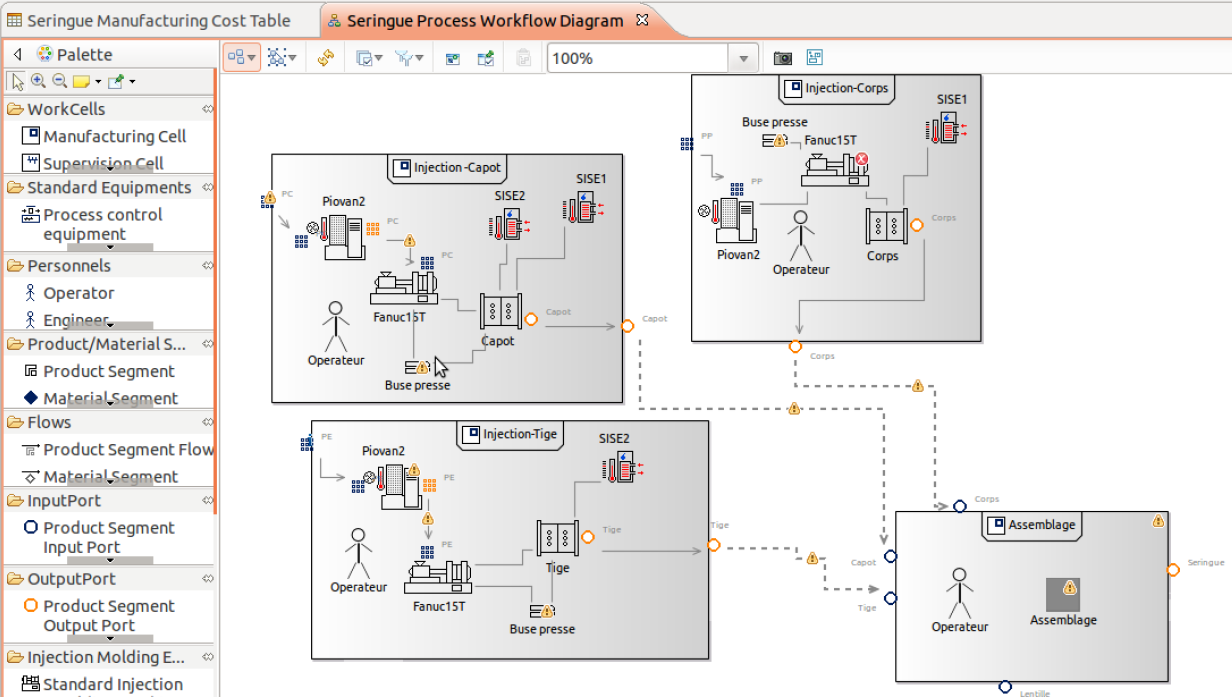
Configuration of plastic products manufacturing

Capella Systems Engineering workbench

Modeling of Android mobile applications

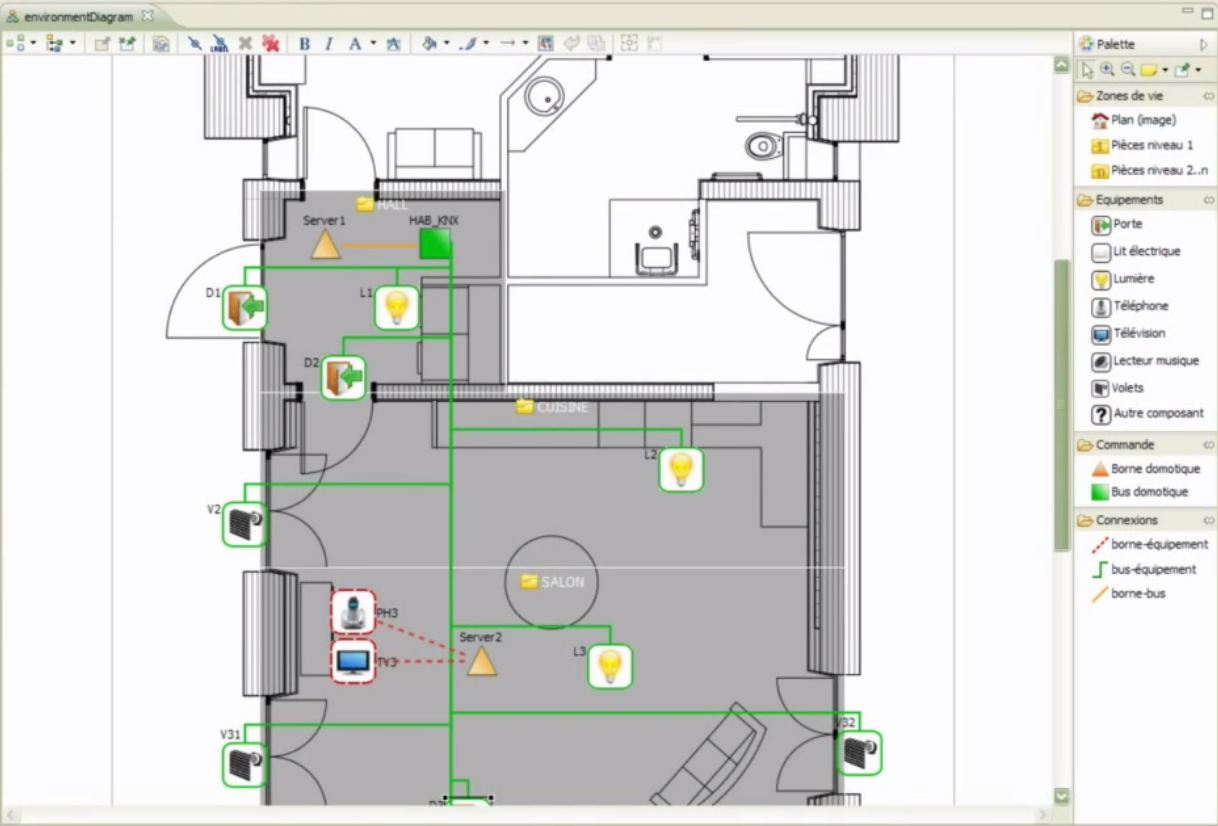
Configuration of home automation systems


The list is not complete ... since we don't know or can't publish all what is done with Sirius, but it will be completed soon with several other examples we have in store.

So, if you also did something that could be published on this page, you can submit a short description and some nice screenshots here :

https://bugs.eclipse.org/bugs/show_bug.cgi?id=448492

Multi-Viewpoints on EclipseCon Program

To demonstrate Sirius on short talks, I'm used to create a modeler from scratch, in ten minutes, on a topic that everybody in the audience knows: the conference they are attending.

For Eclipse Con Europe, I decided to extend this demo in order to illustrate one of Sirius' main feature : the possibility to present the same model according to different concerns.

Using Ecore Tools (based on Sirius), I created a small modeling workbench based on this DSL.


Based on this DSL, my new Conference modeling workbench provides four different representations : 3 diagrams and a cross-table.

Track Diagram

This diagram allows me to create tracks and talks, thank to the tools in the palette. For each track, I can define its speakers, the day of the talk, its location and at what hour it will be given.

Here I have created the talks by Obeo and Thales.


The container presenting each talk has a conditional style : its color depends on its duration (green if the duration exceeds 35 mn).

When populating this diagram, Sirius creates EMF objects based on the conference DSL. They can also be seen in the Model Explorer.


I have also defined two optional layers on this diagram: "Sirius" and "Speakers". Each layer allows me to dynamically change the appearance of displayed objects.


When activated, the "Sirius" layer highlights the talks containing Sirius in their title: the Sirius icon is displayed as a to-right decorator on the concerned talks, and the other talks are colored in gray.


When de-activated, the "Speaker" layer hides the speakers.


Location Diagram

This other diagram automatically presents the same talks grouped according to their location.


Days Diagram

This last diagram presents the talks grouped according to the days.


Program Table

Finally, I have also defined this table which shows the program in a classical tabular way:


Behind the scenes

These representations are simply defined without any line of code, thanks to Sirius declarative mode.


The elements of this tree define which instances of the DSL are displayed in each representation and with which graphical style.

For example, the element TalkContainer allows to display all the instances of Talk which can be retrieve through the talks reference of the current track.


Its style is defined by the Gradient white to light green element which sets the shape, the color and the label of the talk.


Friday, October 25, 2013

Launching Sirius

At Obeo, the last weeks have been very busy to launch Sirius.


Now it's done!

Sirius is here with:
  • An updatesite available from the Eclipse infrastructure
  • The integration in the Luna release train
  • A brand new website: www.eclipse.org/sirius
  • New videos


The team is ready for EclipseCon Europe 2013!

Saturday, March 23, 2013

Obeo at EclipseCon 2013

This week EclipseCon 2013 holds in Boston.


As usual, Obeo will actively participate to this event with the presence of seven of us:

Mélanie Bats

If you attend EclipseCon, try to catch them and ask them questions about EMF, Acceleo, EMF Compare, EEF, Mylyn Intent, Obeo Designer, Polarsys, Buildroot, ... they have a lot to say and to show about these topics!

But the best way remains to attend their talks:
Enjoy!

Thursday, March 21, 2013

Model-based configuration of assistive technology systems

IntelHome Designer: a graphical designer to configure home automation systems for disabled persons. This is what Willy Allegre, of South Brittany University, has prototyped with Obeo Designer during his thesis at LAB-STICC laboratory.

IntelHome Designer consists in modeling a home with all its automated equipments. The model is used to generate configuration files for DANAH, a assistive technology system that pilots automated homes or medical structures. It provides users (elderly and the disabled) with a human machine interface to automate daily tasks.

The graphical designer allows non DANAH-expert persons to describe the environment (the home and its equipments) and the possible interactions between the users and these equipments.


This case-study illustrates a more and more widespread use of DSL (Domain Specific Language): models can be directly created by non-IT users in order to configure their applications. In a previous post, I already presented a similar case-study where models are used to configure an Insurance system.

This is made possible by new generations of tools, such as Obeo Designer, which greatly reduce the time to create graphical designers dedicated to a given DSL.


Thursday, November 22, 2012

Live demo of a graphical DSL

Last week I was in Toulouse, for the second step of Obeo Designer roadshow.

The evening, just after the roadshow, I have been invited by Toulouse JUG for a 15' talk.


I presented a live demo of Obeo Designer: from zero, I created a new graphical designer (definition of an Ecore model, generation of the EMF source code, creation of a sample model and definition of a diagram).

The presentation (in french) has been recorded. It is available on Parleys.com.


At the end, while I was presenting an existing designer (Graal Designer, a designer created for the french Ministry of Defence) Etienne, who was attending the presentation with his own machine, connected to my machine and hacked my diagram in live!

An interesting use-case of collaborative modeling ;-)

There were also four other presentations: GTB (by Baptiste Mathus), Jenkins (by Michaël Pailloncy), JavaFX2 (by Sebastien Bordes) and Scala (by Didier Plaindoux). These presentations are also on Parleys.com.

Thank you to Nicolas Zozol and Baptiste Mathus for the invitation to this event and its organization.

Tuesday, October 9, 2012

How to share a modeling project with other users?

In a previous post, I illustrated the Collaborative Modeling mode provided with Obeo Designer 6.

It allows several users to simultaneously edit a model and its diagrams. Thanks to the fine-grained locking mechanism, only the concerned model elements are locked, and automaticaly released once the modifications are saved.

Now, I will explain how to share a local modeling project on a server, in order to use this collaborative mode and to allow other users to collaborate with you on the same model.


To share a model with several users, only three steps are needed with Obeo Designer.

1) Start the server

The shared model must be hosted on a CDO server which has to be installed and started.

This can be done very easily with the sample CDO servers provided with Obeo Designer. These servers are available through Obeo Designer examples and can be launched with prebuilt Launch Configurations.

This video illustrates how to proceed.


Of course, for a large project, with important constraints, you will have to configure and administrate your own CDO server.

2) Share a Modeling Project

Once the server has started, you can use it to export a local Modeling Project.

This will copy your local project on the server and make it available for other users. 


This video illustrates how to proceed.


Then, this project can be used in a collaborative mode by any other user who can connect to the CDO server.

3) Work with a Shared Modeling Project

When a modeling project has been shared on a CDO server, other users can work with it in a collaborative mode.

They just have to locally create a new Shared Modeling Project which points to the project hosted on the server.


This video illustrates how to proceed.


This Shared Modeling Project is directly connected to the server and reflects all the changes done by all the other users on the same model.

Thursday, October 4, 2012

On the road again!

Once again, Obeo will hit the road with its hot new technologies and products in the bag.
We will meet with our partners, customers and technical community through three main events.

Obeo Designer Roadshow 2012


After the success of 2011's edition, we will organize a new roadshow which will pass through 4 cities in France:
  • Nantes (18/10)
  • Toulouse (15/11)
  • Paris (20/11)
  • Grenoble (6/12)
Each day is free and composed of two parts:

The morning, we will present how custom graphical designers can help in managing complexity and how to create this kind of tools with Obeo Designer. Then, we will let our partners and customers to present case-studies where they have used Obeo Designer. For the first date, in Nantes, case-studies will be presented by MMA and Thales Services.

The afternoon, is dedicated to a "hands-on" session. We encourage each participant to come with its own idea of a graphical designer. And, with the help of Obeo experts, we promise that everyone leave with a first version of a running designer!

Last year, participants left with designers for robots, SOA systems, IT infrastructure, authorization management, etc...


Enterprise Architecture Morning


The 16th of October, we will be in Paris to discuss about Enterprise Architecture.

The morning is free and will be composed of 4 main parts:

  • Obeo's approach to Enterprise Architecture
  • Case-Study by Choregie, in the Insurance domain
  • TEAP, a collaborative research project with Capgemini and DCNS.
  • SmartEA, the solution proposed by Obeo


At the end, we will keep time to allow participants to install SmartEA on their PC and to play with a sample model.


Obeo SmartEA allows Enterprise Architects to define their existing and target architectures (As-Is and To-Be), to evaluate gap analysis and define transformation scenarios. It provides:
  • a graphical environment based on Eclipse to edit TOGAF models
  • a viewpoint technology based on Obeo Designer to create new kinds of representations
  • a database repository to store the models and to allow collaborative work (technology based on Eclipse CDO)
  • connectors to federate existing information with the repository
  • architectural tools to study evolution plans and to analyze their impacts
  • a web client to navigate and to search into the models

EclipseCon Europe 2012


Last but not the least, like each year, Obeo will be present at Ludwigsburg (Germany) for the annual Eclipse conference in Europe.

EclipseCon Europe 2012


Obeo has been selected for 8 talks:


Monday, September 24, 2012

Collaborative Modeling

The classical approach to collaborate on the same model is usually to split the model into several files managed with a source control system such as SVN.

There are two major problems to this approach:

  • lock granularity: it is not reasonable to create a file by model element. So, each time you need to modify an object, you lock all the other model elements contained in the same file.
  • real-time updates: when a modification occurs, the other users have to manually reload the files which contain the changes

These problems have been well described by Alex Lagarde in this post: Live Collaboration with Obeo Designer 6

The solution provided with Obeo Designer consists in a CDO-based repository which contains shared models and their representations (diagrams, tables and trees).


Each time a user changes the property of a model element, only this element is locked. The author of the modification sees a green padlock on the element, while other users instantly see a red padlock on each representation where the same element is visible.

On the example below, the family Smith and the man Paul are locked.


Once the modification is saved, the changes are automaticaly reflected to the other users.

I have created this video to illustrate the collaboration mechanism.