Showing posts with label model. Show all posts

Thursday, March 21, 2013

Model-based configuration of assistive technology systems

IntelHome Designer: a graphical designer to configure home automation systems for disabled persons. This is what Willy Allegre, of South Brittany University, has prototyped with Obeo Designer during his thesis at LAB-STICC laboratory.

IntelHome Designer consists in modeling a home with all its automated equipments. The model is used to generate configuration files for DANAH, a assistive technology system that pilots automated homes or medical structures. It provides users (elderly and the disabled) with a human machine interface to automate daily tasks.

The graphical designer allows non DANAH-expert persons to describe the environment (the home and its equipments) and the possible interactions between the users and these equipments.


This case-study illustrates a more and more widespread use of DSL (Domain Specific Language): models can be directly created by non-IT users in order to configure their applications. In a previous post, I already presented a similar case-study where models are used to configure an Insurance system.

This is made possible by new generations of tools, such as Obeo Designer, which greatly reduce the time to create graphical designers dedicated to a given DSL.


Tuesday, October 9, 2012

How to share a modeling project with other users?

In a previous post, I illustrated the Collaborative Modeling mode provided with Obeo Designer 6.

It allows several users to simultaneously edit a model and its diagrams. Thanks to the fine-grained locking mechanism, only the concerned model elements are locked, and automaticaly released once the modifications are saved.

Now, I will explain how to share a local modeling project on a server, in order to use this collaborative mode and to allow other users to collaborate with you on the same model.


To share a model with several users, only three steps are needed with Obeo Designer.

1) Start the server

The shared model must be hosted on a CDO server which has to be installed and started.

This can be done very easily with the sample CDO servers provided with Obeo Designer. These servers are available through Obeo Designer examples and can be launched with prebuilt Launch Configurations.

This video illustrates how to proceed.


Of course, for a large project, with important constraints, you will have to configure and administrate your own CDO server.

2) Share a Modeling Project

Once the server has started, you can use it to export a local Modeling Project.

This will copy your local project on the server and make it available for other users. 


This video illustrates how to proceed.


Then, this project can be used in a collaborative mode by any other user who can connect to the CDO server.

3) Work with a Shared Modeling Project

When a modeling project has been shared on a CDO server, other users can work with it in a collaborative mode.

They just have to locally create a new Shared Modeling Project which points to the project hosted on the server.


This video illustrates how to proceed.


This Shared Modeling Project is directly connected to the server and reflects all the changes done by all the other users on the same model.

Thursday, May 31, 2012

Modeling P&C Insurance Products, the MAIF Case-Study

EMF (Eclipse Modeling Framework) is mostly used to create model-driven tools for software or system engineers. Here, in this case-study, an EMF-based tool is directly used by business domain experts to create models which are deployed and interpreted at runtime.

MAIF is a french insurance company with 2.8 millions of insured members (ranked 5th in number of insured vehicules and habitations in France).

They needed a tool to get a structured, centralized and unified vision of the P&C (property and casualty) products (IARD in french for Incendie, Accidents et Risques Divers).

The goal was to provide to insurance business experts a dedicated tool to specify their marketing offers and the caracteristics of their products. 

The solution is a product catalog composed of:
  • a product workbench (based on Eclipse) to define and administrate the products structure
  • a repository to store the models
  • a business rules engine (based on JRules) to manage and execute the rules related to the products
Accessible via services the catalog is used to manage production version of contracts and claims.


The structure of the catalog, developed with the assistance of Capgemini and Obeo, is based on an Ecore model which defines the P&C products concepts (catalog, product, coverage, risk object, provision, option, etc) and the way they can be composed.


The product workbench is used by MAIF P&C experts to define the products and administrate their life-cycle.


It provides graphical representations to create, modify, consult, version and validate the products.


These GMF diagrams are graphical representations on EMF models describing each product. They have been specified with Obeo Designer

They selected Obeo Designer in order to speed-up the definition of the important number of GMF views to develop and to facilitate their maintenance.

Additional developments have been done in Eclipse to finalize the workbench:
  • RCP customization to simplify the workbench (menus, toolbars and views) according to the kind of users
  • integration of LDAP to authentificate the users and manage their roles (product manager, validator, ...)
  • integration of SVN to manage collaborative work on products

The models created by the workbench are directly consumed by the IT system through distributed services (progressively remplacing legacy ones).

Without the need of specific IT developements, the deployment of new products is reduced from several weeks to about one week.

This new approach increases the agility of P&C products deployment by reducing the gap between business experts and IT.

    You can find a more detailed description of this case-study, written by MAIF, on www.obeonetwork.com, in the case-studies section of Obeo Designer group (registration required).


    Wednesday, December 1, 2010

    MD Day 2010

    Like every year, the french modeling community has met during the MD Day last week in Paris.


    It was the fourth edition, with a format which makes the success of this event: each partner (11 this year) must come with one of its customers who presents a real-life project where model-driven engineering has been used. Once again, despite optimistic forecasts, we still ran out of place, and we have been forced to close the registrations three weeks before the event ! Finally there have been 275 attendees (234 last year).

    This year, the conference started with Steve Cook's keynote "UML: Past, Present and Future". 

    I already knew the past: I've worked a while with Booch notation in the 90' (remember these little clouds...) ;-) 

    What I found really interesting was the part about the UML dilemnas:
    • What is the real value proposition of UML ? There is often a misandurstanding about why to create UML models.
    • Should DSLs be based on UML ? UML should be more reusable.
    • Is UML appropriate to describe non software domains ? It was not the initial intention of this metamodel.
    • Can UML be a pivot to model semantics ? New versions of OO languages integrate concepts which are not supported by UML.
    Regarding the future of UML, Steve presented the main initiatives:
    • UML is too complex: it is going to be simplified, in order to facilitate its modularization and isolate the parts which are really used.
    • MOF is going to disapear: UML will be defined by itself, in order to facilitate the manipulation of metamodels with any UML compliant tool.
    • UML Diagrams are going to be formally defined: a Diagram Definition initiative has started
    These problems are real, but as Eclipse Modeling Project already proposes solutions to solve this kind of problems, I hope that UML team is not going to reinvent the wheel.

    After the keynote, the conference continued in two tracks, with partners and users talks.

    At Mia-Software we had invited Olivier Corbel, the IS manager of BritAir, an airline company, who presented  its model-driven development process.

    Britair mdday2010


    BritAir uses MagicDraw to create very simple UML class diagrams which represent the domain model of each new application (entities and relations).

    This UML model is used to fully generate RCP applications which allow to manipulate the data (CRUD). The generation rules are defined and executed with Mia-Studio.

    When some business logic is required, it is defined with a textual DSL (business rules in french) and then automatically translated into Java.

    This approach and the corresponding tools are now used each time BritAir has to develop a specific application. The code is 100% generated. For now, six applications have been developped (small maintenance of aircrafts, management of aircraft events, cost accounting, financial forecasts, management of passengers, preparation of flights). Olivier Corbel said that the development managers have evaluated to 10 the productivity ratio on these projects!

    After this presentation, I had decided to talk (in french again) about Model-Driven Development and how to reconcile developers with Model-Driven engineering.

    In the first part of my presentation I constated that, in 2010, Model-Driven Engineering adoption continues to increase:

    • A lot of successful projects have already proven the benefit of Model-Driven Development. In many domains (bank, insurance, defence, aeronautics, transportation, etc) and for various technologies (Java, C#, Flex, Smalltalk, Ada, C, Cobol, etc).
    • Model-Driven Engineering is not only dedicated to the development of new applications. It is also used to maintain the existing ones and facilitate their modernization. The MoDisco project is an example of such initiative.
    • The offer is very rich! Just have a look at the Eclipse Modeling Project: during the last nine months, there have been 14M lines of code committed on 45 active projects, by 113 committers of 20 different companies ! In addition, standards such as UML2 (even if the specification could be simplified) is now supported by a lot of mature tools.
    • The MD Day reflects this adoption with a continuous augmentation (since 2007) of both partners and attendees.
    Despite this fact, we must also admit that Model-Driven Engineering still faces strong resistance. 

    It is easy to challenge the most current arguments:
    • Complexity of UML? UML is complex (even OMG admitted it by launching the UML Specification Simplification RFP), but 20% of UML (class diagram) is sufficient for 80% of needs. Do you really think that a class diagram is more complex than all the web technologies (WSDL/SOAP, Hibernate, Spring, etc) that most developers are familiar with ? And if it's still too complex, you can use a DSL with only your vocabulary: Model-Driven Engineering is not only UML!
    • Too much abstractness? MDD implies that the model should be more abstract than the code to develop (this is what makes the model more sustainable than only the source code). But the level of abstraction is free: it's up to you to define the good level of abstraction depending on the maturity of the team.
    • Complicated Process? MDD implies two new activities (the production of the model and the generation). But these activities can be integrated to any kind of process (from agile to waterfall). And modeling usually corresponds to the design of the application. For those who still think that design is not compatible with agility, just read principle #9 of Agile Manifesto: "Continuous attention to technical excellence and good design enhances agility".
    Nevertheless, one argument againts MDD is a real one: the difficulty to keep in sync the model and the code. If you loose the synchronization, you loose the benefit of MDD. But if you put all the energy of your team in maintaining this synchronization, you loose in agility.

    Hopefully there are solutions to avoid this pitfall: 
    • Model at runtime: the model is not transformed into code, it is directlty deployed and interpreted by a runtime engine. This approach is similar to declarative languages based on XML, for example to describe GUIs (XUL, XAML, etc). The drawback is that you need to implement a runtime engine.
    • Model compilation: the model is transformed into a complete source code, where no additional coding is required (this is the solution adopted by BritAir). This approach is similar to the compilation of a 3GL language (Java, C++, C#, etc) into C or byte code. The drawback is that you need to create comprehensive models and develop complex generators where all the cases must be supported.
    But in most cases, you can't describe all your system with a model. Then the generated code has to be completed manually. In this situation, to avoid the desynchronization between the model and the code, a solution consists in applying the Agile principles to modeling and code generation (we can call this approach Agile MDD).

    Agile Modeling consists in:

    • Useful modeling: only model what is really helpful for the understanding of the system, and what will be exploited by the generator. Avoid modeling any information which is redundant with the code (it would rapidely be out of sync).
    • Simple modeling: if the system is complex, the model can be complex, but it should always be more simple than the code.
    • Viewpoints modeling: decompose the model into submodels describing viewpoints on the system
    • Incremental modeling: the model should be continuously challenged by other people on the project and/or by the generator.
    Scott Ambler has defined several other core principles that you can read on http://www.agilemodeling.com/principles.htm

    To produce code, these principles should be combined with other Agile principles related to generation. The objective of these Agile Generation is to reduce the gap between the model and the code:
    • Targeted generation: you must be able to select only what you need to (re)generate, depending on what has changed (in the model, or in the generator). If each re-generation is global and takes too much time, you may want to delay the modification in the model and directly modify the code.
    • Incremental generation: if the generated code has to be completed manually, these modifications must be protected by the next generations (now, all the generators have this functionality with protected areas).
    • Traceability: the generator should keep the trace between the model and the code to allow to easily navigate from a file to the corresponding model element.
    • Impact analysis: each time you click on the "generate" button, you must be informed of what exactly happened. Which are the new generated files ? Which parts of the existing files have been modified ?
    • Assisted coding: after a generation, you should have a direct access to the parts of the code which have to be manually completed.
    • Adaptability: the generated code reflects architectural and coding choices which can evolve during the project. Templates engine already allow to easily modify the generator. But to facilitate the modification of the right template, traceability mechanisms should give a direct access from the generated code to the corresponding template definition.
    Of course, these Agile MDD principles are not exclusive: they should be combined, when it is possible, with Model at Runtime and Model Compilation approaches.

    To illustrate Agile MDD, I ended my talk with a presentation of the Mia-Studio tool suite which supports these Agile Generation principles. 

    Then Tony Rostren shown a short demonstration of the tool:
    • Modeling of the cinematic of an application in UML with MagicDraw
    • Generation of an executable application based on Struts
    • Edition of the generated code in Eclipse
    • Navigation from Java source code editor to corresponding element in MagicDraw
    • Modification of the model and regeneration of the corresponding code
    • Access to a template from a selected fragment of generated code
    The full demonstration is available here:

    I spent the rest of the conference talking with customers and partners and demonstrating our tools. I could only attend one other presentation. It was the Sodius one, with Yann Lebeaupin talking with EADS about tools interoperability to support system engineering. 

    You can find all the other presentations on slideshare: http://www.slideshare.net/MDDAY/presentations

    Thursday, October 28, 2010

    Spy On Your Models - Part 3


    In this sequence of posts, I explain how to use the Model Browser provided by MoDisco to inspect an EMF model.


    In the first two posts, I have described how to directly access to instances of a given type, and how to navigate through the model elements. In this third post, I will now describe how to customize the browser.


    When your model contains a large number of model elements, you need help to identify the nature of the objects your are looking for. A good idea is to define a graphical extension to associate a specific graphical rendering (icon, label, color, etc). It can be achieved with the EMF.Edit framework by developing content and label provider classes. You can develop and deploy a new plug-in, and once this plug-in is installed, the customization is applied systematically. 


    But in some situations, you need a more flexible customization. A customization which presents the model according to a given viewpoint. A customizations that you apply temporarily, depending on a working situation. 
    This is what you can do by creating a UICustom model. 


    A UICustom model defines graphical properties for elements of a metamodel (a ECore model). These properties can be loaded dynamically by the Model Browser and applied to the model elements.
    First, you have to create a new MoDisco project:


    Then, create a UICustom model in this project:


    The UICustom creation wizard asks which is the metamodel to be customized. It proposes all the ECore models registered in your Eclipse:


    Once created, you can edit the UICustom model with the editor provided by MoDisco:


    Now you can select a metaclass and edit its graphical properties (label, bold, italic, font, color, icon, visible, etc). You can also customize the attributes and the references of the metaclass.


    Each graphical property can be set with a static value (for example, define a new icon for all the instances of Class) or a dynamic value, computed by a Query (for example, the label of an instance of Class can be italic if its "isAbstract" value is true).


    To understand how to define a customization, you can read the user manual in the MoDisco wiki.


    Once saved, a UICustom is applicable. Click on the "Load Customization" button in the toolbar :


    Your UICustom model appears with all the other registered UICustom models. You can select it to apply it on the current model loaded in the Model Browser.


    In the next post, I will describe how to create and execute queries on model elements directly from the Model Browser.

    Thursday, April 22, 2010

    Architecture-Driven Modernization Case-Studies


    William Ulrich and Philip Newcomb have recently published "Information Systems Transformation, Architecture-Driven Modernization Case-Studies", a reference book on Software Modernization.

    This book has been written by two of the most active members of the Architecture-Driven Modernization task force, the OMG initiative which aims at defining standard specifications for the modernization of existing software systems. They first introduce Architecture-Driven Modernization technologies, standards and approaches. Then they have compiled ten detailled case-studies on real modernization projects on various business domains (bank, administration, tourism, air-trafic management, combat system) and technologies (COBOL, VB6, Powerbuilder, ...).

    With Gabriel Barbier (Mia-Software), Yves Lennon (Sodifrance/SoftMaint) , Hugo Brunelière and Frédéric Jouault (INRIA/AtlanMod) we have written one of these case-studies.

    In this chapter we first describe the modernization process and tools used by Sodifrance to migrate Software Systems. The approach has been imagined and protyped thanks to a collaboration established in 1993 bewteen Sodifrance and Jean Bezivin, from University of Nantes, who was working on the representation of existing software systems with a technology based on sNets, a first generation of model engineering platform.

    The sNets technology was immediately used by Sodifrance to develop a semantic discovery tool, named Semantor, to analyse any COBOL program and provide a fine-grained level of information about its internal structure and data. This tool is still evolving and has been renamed Mia-Mining.

    In parallel, at the end of 1998, based on the experience gained in the rebuilding of an insurance company’s contract management system, where modelling and tailored code-generators were successfully used, Sodifrance started developing its own model transformation technology. From this work, in association with Jean Bezivin who brought his knowledge about early work at OMG on MOF, was born Mia-Studio, a model transformation tool to develop and run model-to-model transformation rules and model-to-text generation templates.

    With these tools, Sodifrance has progressively built a chain which can be used on architecture migration projects, to transform existing applications from client-server to n-tiers and SOA architectures.


    This chain is composed of three main steps:
    1. Extraction of a comprehensive model (the initial model) of the existing application from its assets (source code, configuration files, development repositories, etc).
    2. Transformation of the model of the existing application into a comprehensive model of the target application (the target model).
    3. Generation of the source code of the target application from the model of the target application.
    To illustrate how this chain can be used, the chapter describes a project conducted by Sodifrance to migrate an application from VB6 to JEE for Amadeus Hospitality the leader in IT solutions provided for the tourism and travel industry.

    The initial application, named RMS (Revenue Management System), was developed in VB6, and was performing queries on an Oracle database. It was composed of 300 screens, 200 of them displaying charts (pie charts, bar charts or line graphs). The VB6 code was composed of 306,000 source lines of code, VB6 code in 216 classes and 261 modules.


    The migration project was completed by Sodifrance in 1,600 man-days with ten engineers over a year. The transformation of all the VB6 code (access to data, business rules and interface) was 80% automated, while the definition of the screens (Forms) was only 50% automated, due to the necessity to redesign them for a web mode. The new version of RMS is now composed of about 300,000 lines of code in 1,000 Java classes and 310 Jsp (Java Server Pages).


    In the last part of the chapter, we present MoDisco, the Eclipse project dedicated to software modernization. This project has been created by AtlanMod during Modelplex, a research project funded by the European Community.

    Because of the widely different nature and technological heterogeneity of legacy systems, there are several different ways to extract models from such systems. MoDisco proposes a generic and extensible metamodel-driven approach to model discovery. A basic framework, including implementations of OMG standards such as KDM or SMM, and a set of guidelines are provided to the Eclipse contributors to bring their own solutions to discover models in a variety of legacy systems.
    One of the first industrial use cases using MoDisco has been the understanding of a Large Scale Data Intensive Geological system for WesternGeco, a geophysical services company

    Saturday, April 10, 2010

    JEE, Flex and MDSD in Tunis


    Last week I was in Tunis.

    The weather was not as sunny as expected, but it was not the reason of my travel. I was there to setup a MDSD (Model-Driven Software Development) process for a tunisian bank.

    This bank has planned to redevelop its Core Banking System with new technologies (JEE and Flex). In order to facilitate the development and provide both flexibility and quality to the future system, they have decided to adopt a Model-Driven approach.

    My mission consists in helping the IT team to put this approach in place.


    Developing a generator for a customer is an activity which I usually decompose in four steps:


    Development of a reference application

    In every industrialization process, the first step consists in identifying the scope of what can be beindustrialized. In a MDSD process, the better way to define this scope is to manually develop a reference application: a subset of the future application which contains examples of each coding patterns.

    During a first stay, few weeks ago, we had specified and started to develop a reference application based on a cash withdrawal scenario. Behind this scenario, we had defined several services to invoke, the corresponding business objects (BO) and data transfer objects (DTO), and the existing Oracle tables and stored procedures which have to be reused. Based on the languages and frameworks selected by the customer (Flex with the CairnGorm framework, JEE with the Spring and Hibernate frameworks), we had designed the reference application and defined the coding patterns to use.

    This week, when I began my second stay, the customer had finished the development of the reference application, and it was running.

    Identification of the Generation Scope


    Once a reference application exists, the second step consists in analysing its source code to identify the variability factor of each line of code:
    • What is the minimal information required to be able to produce this line of code?
    • Is this information specific to the reference application or generic ?
    • Can we produce other lines of code with the same information?
    • What is the ratio between the effort to declare this information and the effort to manually produce all the corresponding code?
    The answers to these questions, coupled with a discussion with the customer, help defining the generation scope:
    • which code can be produced automatically?
    • which code needs to be developped manually?

    Definition of Modeling Rules


    Once the generation scope is identified, then we need to define how the information required to generate the code can be defined within a model. There are three possibilities:
    1. Defining a Profile in a UML Modeler
    2. Developing a Domain-Specific Modeler
    3. Developing a Domain-Specific Concrete Syntax
    For my customer in Tunis, I have proposed the first option and defined a UML profile containing a first set of about 20 stereotypes (application, service, bo, vo, dao, table, ...). With this profile I used MagicDraw (which provides very powerful extensibility and customization mechanisms) integrated in Eclipse to create a model of the reference application.

    Development of Generation Templates

    The fourth step is the easiest: templates can be developped from the reference application by copy/pasting fragments of code. The fragments parts which are generic remain in the templates, while variable parts are replaced by calls to the model (using EMF APIs).

    Last week, it tooks me one day to develop the Mia-Studio templates for the presentation layer. From the EMF model of the reference application, the templates have regenerated 6 MXML files and 19 ActionScript files (Commands, Events, Service Delegates, Front Controller, and Value Objects). The MXML files contain the graphical definition of the GUI: they will be generated only once, just to provide a first application which can be executed. Then they will be edited and maintained with a WYSIWYG designer.


    The templates for the two other layers (Business and Data) will be developed with a colleague during a third stay in Tunis.

    Then our role in the project will be to assist the team in modeling and developing the first application and adapt the MDSD process to integrate the unforseen cases.

    Saturday, March 27, 2010

    Back from EclipseCon 2010

    I came back to home today, after one week at Santa-Clara, near San-Francisco, attending my second EclipseCon.

    Last year, I only presented a poster. But this year I gave a talk about MoDisco and I participated to the Modeling Project runway organized by Kenn Hussey. Gabriel Barbier, my colleague from Mia-Software, had also a talk with Henrik Lindberg about B3 and the possibility to use MoDisco to extract build information from source code .


    Once again, I really enjoyed the conference and its organization: lots of interesting talks, very good keynotes (Steve Harris show was THE event of the week), but most of all it is the best way to share ideas, to meet people and to show what we working on.

    This year, we spent a lot of time explaining a project we propose to create. The EMF Facet project will provide mechanisms to dynamically extend ECore models: adding properties, references, operations without changing the initial ECore model. These mechanisms have already been developped as part of the MoDisco project. We propose to externalize them to make them more reusable by other projects. We received very good feedback on this project from all the Modeling Project members to whom we presented our ideas and the existing components. We will first submit the proposal to the Modeling PMC next week.

    Tuesday, February 2, 2010

    MoDisco 0.8M5 available for download


    Version 0.8M5 of MoDisco, has been released yesterday : http://www.eclipse.org/gmt/modisco/downloads/

    It already embeds the components which will be available in the final 0.8 version running with Helios.

    Today I would like to focus on two new components (Query Manager and Facet Manager) and how they are used by the new version of the Model Browser to allow defining custom (and dynamic) viewpoints on your EMF models.

    These mechanisms have been developped to support understanding of complex models automatically created from legacy source code. But you can also use it on "classic" EMF models created manually with graphical tool such as Papyrus.

    Query Manager (new)

    This is a new component providing a facade to evaluate queries against an EMF model independently from the query mechanism. Implementations are provided to call queries written in Java, EMFQuery, OCL and XPath.

    A QuerySet containing OCL and Java queries


    Facet Manager (new)

    This new component provides a mechanism to dynamically extend EMF model elements by adding "virtual" attributes and relations computed by queries.


    ModelBrowser

    The look & feel has been reviewed to be more compliant with Eclipse UI checklist.

    With the new version it is possible to dynamically customize how the EMF model elements are displayed. Any customizable feature (label, color, icon, police, ...) can be set statically, or dynamically using a Query executed on each element to display.

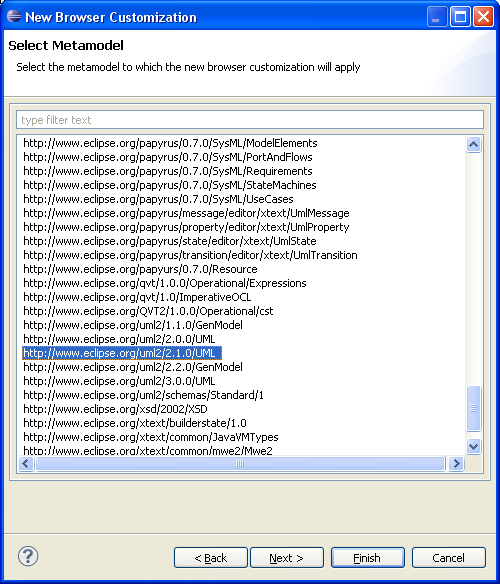
    Wizard to customize the Browser for a given metamodel

    You can also execute a Query against a model element directly from the browser

    Selection of a model element from the Browser

    Selection of Query to execute on the selected element

    Result of the Query displayed in a table

    If you want the Query to be always executed on each element of the same type, you can define a Facet to see the Query as a virtual type, attribute or relation in the browser.
    The Query "subClassifiers" visible as a "virtual" relation on Class


    Friday, January 29, 2010

    How to create an EMF model from a Java application ?


    Is it possible to reuse EMF-based tools with Java source code ? Yes if you have your Java source code translated into an EMF model.

    This is the aim of the Java component provided by MoDisco. This component is composed of a ECore definition of a java application and a discoverer which creates EMF models from an EClipse project containing Java source code.

    The ECore definition declares all the concepts of the Java language : Package, ClassDeclaration, MethodDeclaration, Parameters, VariableDeclaration, IfStatement, Assignment, CastExpression, LineComment, ...

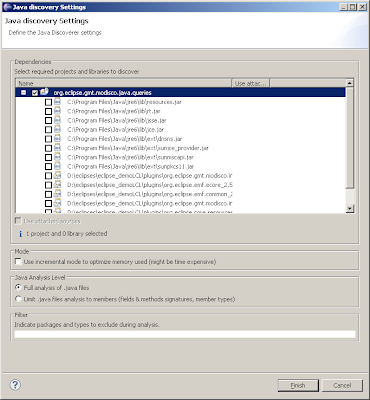
    To create an EMF model using this metamodel, select your project and right-click on the menu "MoDisco>Discover Java model from Java project...". A wizard appears to select the analysis options :
    • You can extend the analysis to dependencies (the JAR used by the project).
    • You can use an incremental mode if you need to optimize the memory usage
    • You can limit the analysis to declaration members if you don't need a model of the instructions contained within the methods
    • You can use a filter to exclude Java classes during the analysis

    The result is an EMF model which can be opened with the EMF reflexive editor or with the MoDisco generic browser. This browser allows accessing directly to instances of a specific class (for example all the MethodDeclarations) and navigating through all the references (composed or not).

    This model can be used with other EMF-based tools to check architectural or coding norms, to generate other models (UML or Domain-Specific) or to regenerate an other application (if you modify the Java model, MoDisco provides templates to regenerate Java source code).

    Saturday, October 31, 2009

    Eclipse Summit Europe 2009

    This year was my first attending ESE, and it was worth it !

    The talks on modeling were very interesting (Xtext, EMFQuery, Papyrus, ...) and it was nice to meet the guys directly involved in the projects we are interested in.

    The Cloudsmith team, for example, to discuss how we could use MoDisco on the B3 project to analyse plugins and create models of builds. Or André Dietisheim about our tests with CDO to manage models of large Java applications created with MoDisco. Nice also to talk with Kenn, Ed, Ralph and many others.

    I had the chance to talk during both the Modeling Symposium (Tuesday) and a session dedicated to MoDisco (Thursday).

    With my colleague Gabriel Barbier of Mia-Software, who presented the demo Thursday, we shown how to create fine-grained models from Java source code (based on a Java.ecore metamodel), and how to navigate through this model with the model browser we have developped. We put the focus on the customization and the extensibility of this browser by using queries.

    You can dynamically change the icon, color, font ... of the instances of your models (by defining a UICustomization, stored in a EMF model), or add "virtual" types (not originally defined in your Ecore metamodel) with "virtual" properties and references (by defining a RoleSet, also stored in a EMF model). The query mechanism that we provide is generic : it allows integrating queries written in Java, EMFQuery, OCL, XPath or ATL.


    We presented the 0.8 version which is still under development (planned for the end of 2009). But thanks to Nicolas Bros who have put the releng in place, it is possible to download an integration build.

    The demos are online :
    - Demo during the Modeling Symposium
    - Demo during the MoDisco short talk