MoDisco 0.8 RC2 has been released last week. It contains all the features which will be shipped with the final Eclipse Helios release (available June 23, 2010).
Edition of models
MoDisco provides a browser to inspect complex EMF models. Now it is possible to use the
ModelBrowser to edit and modify the instances of the loaded EMF model:
- Edit attributes through the Properties view
- Create new children elements
- Delete a model element (with all its references)
- Cut/Copy/Paste a model element
- Undo/Redo modifications
- Save and Save As the model
In addition, when the model is externally modified, the browser is automatically refreshed.
Collapse Link option
One of the main differences between the MoDisco
ModelBrowser and the default EMF Reflective Editor is the way the children elements are displayed.
In the Reflective Editor, all the children model elements are placed directly under the parent model element: you don't see how the children are connected to the parent.
In the MoDisco ModelBrowser, the children are grouped under an intermediate node corresponding to the link defined in the metamodel.
This feature is very useful when instances of the same type can be associated through several different links: you can know precisely how the children are connected to the parent.
But in some cases this option is not convenient (for example when each children of a given type can only been attached with one relation).
That's why we have added a new option to the
Customization model and corresponding editor: you can now collapse a link to hide this link in the browser and display the corresponding children directly under the parent.
Reusable Model TreeView
The TreeView developped for the
ModelBrowser is now compliant with
CNF (Common Navigator Framework).
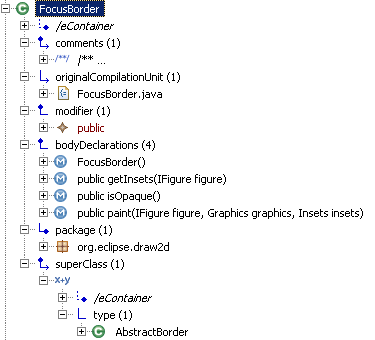
This TreeView displays the model elements properties and allows accessing to related objects by navigating through relations defined in the metamodel.
Now this TreeView can be reused and integrated to any component compliant with CNF, and then benefit from the customization and extensibity mechanisms to dynamically configure which properties and relations are visible, add derived attributes and relations, and change how the model elements are displayed (label, color, icon, ...).
For example, the TreeView can easily be integrated into the Project Explorer to inspect the content of any EMF model:
The TreeView has already been adopted by the Papyrus team to replace the default treeview in the Package Explorer.
Java Model Query creation wizard
MoDisco provides a
QueryManager to allow executing model queries independently of any technology. Drivers for Java, OCL and JXPath are provided to execute queries written with these technologies.
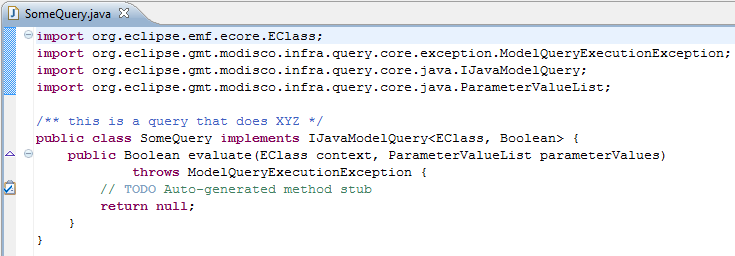
Since MoDisco 0.8 M6, a wizard facilitates the creation of queries written in Java:
The wizard generates the corresponding Java class stub, with the correct imports and generic parameters instantiation.