Wednesday, March 16, 2011

How to follow Obeo at EclipseOn 2011?

EclipseCon 2011 starts in less than one week from now.


This year, Obeo will be well represented with five of us going to Santa-Clara:
- Etienne Juliot, Vice-president and co-founder of Obeo, member of the Eclipse Foundation Board
- Cédric Brun, CTO of Obeo, member of the Architecture and Planning council, leading several Eclipse/Modeling projects
- Mariot Chauvin, committer on Acceleo, GMF and SWTBot
- Mikaël Barbero, EMFPath project leader
- and me ;-)


The program will be very intensive for us, with seven talks to give:

We are also in competion with five Eclipse Community Awards finalists:

However, we don't forget the most important thing at EclipseCon: sharing ideas (and beers) with other Eclipse fans!




Wednesday, March 2, 2011

Using viewpoints to edit complex models

Based on GMF, Obeo Designer adds several viewpoint mechanisms which facilitate the edition of complex models.

One of the main difficulties with graphical representation of complex models is the number of nodes and edges visible on a same diagram.

Obeo Designer comes with the concept of layer which allows to select the types of graphical elements to display. Inspired from image manipulation tools, several layers can be defined on a diagram and optionally selected or unselected, depending on what the user wants to see from his model.

Based on the simple Family scenario (detailed in my previous post), this demo shows how to define layers for parental and brotherhood relationships.


Another way to reduce the models complexity, is to use tabular representations. With Obeo Designer it is possible to define custom tables representing elements of the model. The lines and the columns are fully customizable depending on the objects and which properties have to be displayed.

This demo, shows how to define a table representing members of a family. Columns contain the names of the parents and other columns contain the numbers of sons, daughters, brothers and sisters.

Monday, February 21, 2011

Creation of a graphical designer in 5 minutes

After one month at Obeo, the serious things have started for me ;-)

I have spent the last two weeks discovering Obeo Designer 5.0 and working on the videos which will be available on the new website (www.obeodesigner.com). This new version is going to be officially released in ten days, so each minute counts!

Obeo Designer is a tool which allows to create specific modelers in Eclipse. It is based on EMF, GMF and Acceleo.

I have been very impressed by the ease and rapidity for creating my first designer. Of course I'm familiar with Eclipse and EMF, but I had never developped with GMF before. In one day, starting from scratch, I have been able to create my first designer, with several layers (to optionally show or hide some kinds of relations) and a table (to represent my model with lines).

For the demos, we have volontarily chosen a very simple example to illustrate the Obeo Designer approach. With this example, the concept of Family (men and women related by parental relationships), each Obeo Designer functionality can be easily described.

I have posted the first video today. It is a first overview which explains, in five minutes, how to create a first modeler with zero code and zero deployment.


Other videos will come soon to demonstrate the other functionnalities. Stay tuned!

Sunday, January 16, 2011

A new start

Friday was my last day at Mia-Software.

I started working at the Sodifrance group fifteen years ago already. And it has been a very exciting experience!

In 1995, I was working in Paris and I was looking for a new job. As I was hesitated between two propositions, I decided to call Jean Bezivin, who taught me Object-Oriented technologies three years before at Nantes. He asked me "Why don't you come back to Nantes? Yves Lennon, a good friend of mine, is developping software engineering tools in Smalltalk there. He is looking for developers like you". I immediately called Yves, we met, and he hired me.

My first project at Sodifrance was for MMA, an insurance company. This project, called SIGMMA, was a very ambitious re-development of the products and contracts management system in Smalltalk. I worked for three years on this project. I was responsible for designing the database schema and its mapping with the business objects implemented in Smalltalk. As these business objects was defined in Rational Rose with the Booch notation (UML was not existing yet), I developped lots of tools to exploit these models and generate Smalltalk code and Oracle queries.

When I left the project, I had the idea to develop a template-based code generator which could facilitate the development of specific code generators. I proposed this idea to Yves Lennon who said "Go!". In the same time, Java was taking off, with tools like VisualAge. I decide to use Java to develop my new tool which I called Scriptor. Thanks to internal projects which experimented the tool and helped me to improve it, Scriptor was selected in 1999 by Transpac, a France Telecom subsidiary, to generate VB code. It was the first one of a long list of other customers (Thales, Banque Populaire, BNP-Paribas, MAAF, Crédit du Nord, SNCF, etc).

In 2004, we created Mia-Software, as a Sodifrance subsidiary, to structure the R&D and to give a better visibility to the product. I took the CTO position. We renamed Scriptor to Mia-Generation. We added two other modules (Mia-Transformation, for model-to-model transformations and Mia-Documentation for documentation generation) and group these tools in a suite called Mia-Studio. We created also a new tool suite called Mia-Insight to package and distribute tools already developped by Sodifrance for application portfolio management and application mining.

In the same time, Sodifrance, which is the french leader in Software Modernization, has developped a new expertise in Software Migration by using Mia-Insight and Mia-Studio. Based on Model-Driven Engineering, the principle is to extract models from existing systems, to transform these models into models of the new system and to regenerate code from these new models. This approach has been used on lots of projects, for example to migrate VB6 code to C#, or Oracle Forms to JEE.

In 2006, we started a new research project called Modelplex, funded by the European Community. One of the partners was AtlanMod, the research lab leaded by Jean Bezivin. He had just created MoDisco, a new Eclipse project dedicated to the extraction of models from legacy systems. I proposed to Yves Lennon to take the opportunity of the Modelplex project to start developping open-source components and to contribute them to MoDisco. The objective was to develop a reference platform for software modernization projects based on Eclipse and OMG standards. Once again, Yves said "Go!".

Last year, MoDisco 0.8 has been released with Helios. We have presented the project to several Eclipse conferences already, and we know that many users are using its components (such as the Model Browser and the Java Discoverer). The Mia-Software team working on this project (Gabriel Barbier, Nicolas Bros, Grégoire Dupé, Fabien Giquel and Nicolas Guyomar) is very motivated, and Sodifrance has started to provide feedback from real modernization projects (for example to refactor JEE source code).

But after all these years working at Sodifrance and Mia-Software, I felt that I needed a new challenge.

That's why I accepted the Obeo proposition to be their Product Manager. I will mainly focus on Obeo-Designer and Obeo-Agility.

It was not an easy decision to take, but it has been well understood at Mia-Software. The transition went very well, and I'm confident that the products (Mia-Studio, Mia-Insight and Mia-Quality) and the Eclipse projects (MoDisco and EMF facet) are in good hands!

Now, I'm ready to take a new start!

Friday, December 17, 2010

Traceability between an EMF Java model and the corresponding source code

MoDisco 0.9M4 has been released this week with Eclipse Indigo M4.

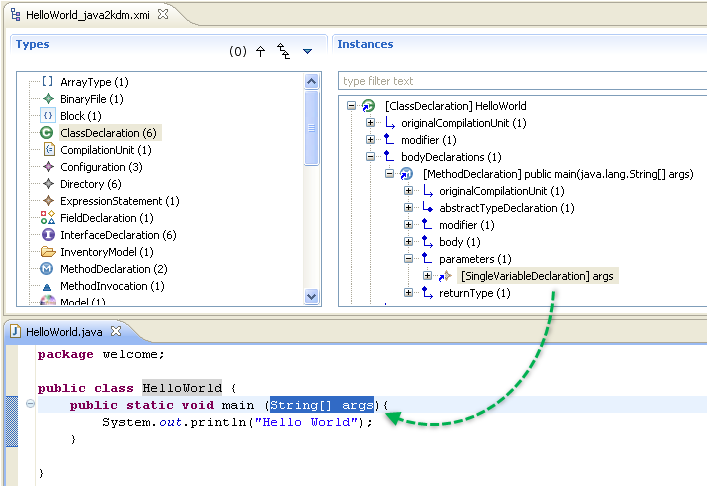
One of the new interesting features is the traceability between an EMF model created from the reverse-engineering of a Java application and the corresponding source code.

It allows to directly navigate from elements of the Java model in the MoDisco Model Browser to the corresponding code fragment in a Java editor.


This feature is provided by a new Java discoverer which can be executed with the MoDisco menu "Discover Java and Inventory model from Java source code" available on a Java project.

This discoverer automatically creates three EMF models:
  • a Java model describing the content of the source code: it is the model created by the basic Java discoverer.
  • a KDM Inventory model describing the structure of the Java project (all the files and folders).
  • a traceability model containing relations between the Java model elements and source code fragments
If you need to know more about these models, you can read the documentation of the discoverer.

When you launch the discoverer on a java project, the traceability model is automatically opened in the MoDisco model browser. 

To activate the synchronization with the Java source code editor, you need to activate the "Synchronize with source code option". 


Now, when you click on a model element in the model browser, the corresponding source code is automatically highlighted in the Java source code editor (otherwise, the double-click on an element opens the property view).

Wednesday, December 15, 2010

Spy On Your Models - Part 4

In this sequence of posts, I explain how to use the Model Browser provided by MoDisco to inspect an EMF model.

In the first three posts, I have described how to directly access to instances of a given type, how to navigate through the model elements and how to customize the browser.

In this last post, I will now describe how to create and execute queries on model elements directly from the browser.

The features presented in the previous posts, allow you to navigate through the elements of your model by traversing the links. You can also highlight some characteristics of specific elements by defining a customization which dynamically change their rendering (icon, label, font, color, etc).

But in some situations, you would like to calculate values from model elements. These values could be of basic types (numbers or strings) or could be other model elements.

MoDisco provides a mechanism to execute queries interactively on model elements selected in the Model Browser. First, I will explain how to execute queries, and we will see later in this post how to declare and implement them.

There are two possibilities to execute a query.

The first one consists in selecting model elements in the browser and clicking on the menu "Execute Query ...". It opens the "Query Execution" view which contains two main parts:

  • The elements on which to execute the query. It is filled with the elements you have selected, but you can also remove elements from this list or drag&drop new elements  from the browser.
  • The registered queries which can be executed on the selected elements


When you click on "Execute" the selected query is executed on each model element and the result is displayed in a table (more possibilities will be provided with future versions).


The table displays each returned value on a line. If the result is a basic type, the table contains only one column. But if the result is a model element, the table contains several columns:

  • A colum "Label" which contains the calculated label of the object.
  • A column "Metaclass" which contains the type of the object
  • A column "/eContainer" which contains the parent of the object
  • A column "Query Context" which contains the object for which the query has returned the object
  • A column for each attribute of the corresponding metaclass
  • A column for each reference of the corresponding metaclass (for nary references, the tablel displays the number of related objects).
On each line, it is possible to re-execute a query or to browse the selected element with the model browser.

To execute a query from the browser, the second possibility consists in adding the query to a model element in the browser by clicking on the menu "Dispaly Queries on Selected Element":


A dialog is opened with all the applicable queries:


The selected query is added to the model element. When you click on this query, it is executed and the result is displayed under the query:


Now, to create your own query, the first step consists in creating a QuerySet in a MoDisco project: right-click on the project, select the menu "New>Other" and select "MoDisco / QuerySet model":


Give a name to your new QuerySet and MoDisco creates it in the project:


A QuerySet is a model which contains the declaration of the queries. The new QuerySet is empty. So, to start declaring the queries, just double-click on the QuerySet to open it with the dedicated editor:


Now, you need to associate the QuerySet to a metamodel: all the queries will apply on model elements of the corresponding models. 

Let's say we want to declare queries for UML model elements. This association is done in two steps: 
  • Load the ECore definition of the metamodel: right click on the ModelQuerySet instance, select the menu "Load meta-model ressource" and select the right ECore definition.

  • Associate this metamodel to the QuerySet: double-click on the ModelQuerySet instance to open its property view, click on the button in the "Associated Metamodels" property field, and select the metamodel.

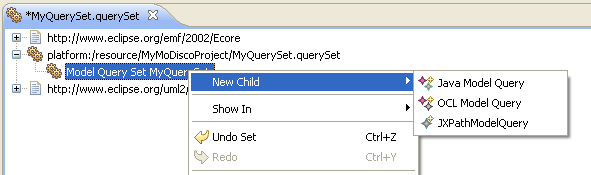
Now, you can start declaring the queries: right-click on the ModelQuerySet instance and click on the "New Child" menu. You can declare queries of three kinds: Java, OCL or XPath.


For each query, you have to declare its name, its scope (on which elements the query is applicable), its return type and its multiplicity (lower and upper bounds). Implementing the body of the query depends on the kind of query:
  • OCL: enter an OCL expression in the "Query" property
  • XPath: enter an XPath expression in the "Query" property
  • Java: enter the name of a Java class which implements the query


To know more about how to declare a Query, you can read the reference documentation of the MoDisco QueryManager.


Monday, December 13, 2010

MDD Case-Study: RCP Code Generation in an Airline Company

I was recently asked to translate into english  the case-study presented by BritAir during MD Day 2010. So, here is a summary.

BritAir, a french airline company, is a subsidiary of Air France which transported about 3,5 millions of passengers last year.


Another activity of BritAir is the training of pilots, commercial staff and maintenance technicians of other companies.

Despite BritAir has no developer, the company wanted to keep the control and the quality of its applications:

  • Normalize the user interface of the applications
  • Normalize the way the applications are designed
  • Improve the development productivity
  • Document the applications

To achive these goals, Olivier Corbel, the IS Manager, decided to put in place a new development process based on a Model-Driven approach. This project was conducted with Mia-Software and Sodifrance.

The principle of the BritAir approach is based on two main ideas:

  • A model describing the business data (entities, identifiers, attributes, child/parent relationships)
  • An automatic generation of graphical interfaces (Eclipse RCP) for classic functions (cread, read, update, delete, search and export to Excel)


In addition, the business logic is also described in the model: a concrete syntax has been defined to declare some rules in french. It allows to declare variables, to set values, to test, to loop, etc.

The model is created with MagicDraw, an UML modeling tool, and translated into code (Eclipse RCP and Hibernate) with Mia-Studio, the model transformation engine developped by Mia-Software.

The generated applications are complete and don't require any additional code (the business rules are also transleted into Java). They are deployed on servers with Tomcat, Xfire and Oracle.

It took 300 days (total effort between march 2008 and july 2009) to setup the process, define the target architecture, adapt the tools and train BritAir's staff. The team was composed of three people of Mia-Software (a project manager, a MDA enginer and a JEE architect) and one architect of BritAir (requirements and validation).

Several applications have been developped in parallel, in order to challenge and test the new process and tools.

Now, each time a specific development starts, it uses this approach. Until now, six applications have been developped:

  • small maintenance of aircrafts
  • management of aircraft events
  • cost accounting
  • financial forecasts
  • management of passengers
  • preparation of flights. 

Olivier Corbel has identified several benefits of this MDD process:

  • Industrialization of the development activity: normalization of modeling and coding, and better documentation.
  • Independance of the models from the target architecture (neither RCP nor Hibernate concepts in the models).
  • Design is mandatory, in order to generate the application.
  • Better quality of code, since it has been qualified first and then converted into generation rules
  • Better productivity: during its talk, Olivier Corbel said that the development managers have evaluated to 10 the productivity ratio on these projects!
  • User experience: the applications are homogeneous and always provide the same ergonomy to the users
  • Prototyping: it is easier to provide early versions to users and take their feedback into account to improve the application


For BritAir, the next step now is to bring evolutions to the platform:
  • Support authorization management
  • Extend the expressiveness of the business rules language
  • Improve the integration of new applications with existing ones (generated or COTS)
  • Add a new generation target (web client)