Thursday, September 23, 2010

EMF Facet project has been created

EMF Facet is a new Eclipse/Modeling project which will provide solutions to extend existing metamodels without changing them. It has been provisioned recently in EMFT by Greg Dupé of Mia-Software, the co-leader of the project.


With EMF Facet, it will be more easy to dynamically extend and customize a tool based on EMF.

The idea is to allow defining new attributes, new relations and new types in a non-intrusive way (you can read this older post about EMF Facet).

This mechanism has already been developped in the MoDisco project (the Eclipse/Modeling project dedicated to Software Modernization). It is completed by a QueryManager component which allow executing queries on a EMF model independently from the query technology (bridges for OCL, Java and XPath are already available). As it is independent from Software Modernization purposes, the corresponding code is going to move to this new EMF Facet project.

After some refactoring, it will be enriched with other components (such as customizable widgets to display extended EMF models). First version is planned to be ready in June 2011 for Indigo, the next Eclipse release. Before this date, early versions will be available with intermediate Indigo milestones.

To know more about this project, don't miss the talk EMF Facet: a Non-Intrusive Metamodel Extension Tooling, Thursday, the 4th of November during Eclipse Summit Europe 2010, in Germany.

Wednesday, June 30, 2010

Eclipse DemoCamp in Nantes

An Eclipse DemoCamp will be organized in Nantes the 8th of July.


It is a good opportunity to discover what's new in Helios and to meet teams directly involved in the development of the platform.

Here are the projects which will be highlighted:

- Glassfish, the JEE Application Server
- STP, the SOA Tools Platform
- MoDisco, the Model-Driven Software Modernization platform
- Acceleo, the Model-to-Text project
- ATL, the Model-to-Model project

Each project will be presented by one of their commiters (from SERLI, Mia-Software, Obeo and INRIA).

It's free and only two hours from Paris!


Thursday, June 24, 2010

Getting feedback from adopters

The OMG Technical meeting at Minneapolis is over, I will come back to Nantes tomorrow.

This kind of event is a very good opportunity to meet users of the tools we have developped for Eclipse. As anybody can download these tools, it is difficult to know precisely how they are used, and by who.

For example, this week I discovered that Nicolas Rouquette from the NASA, was using the MoDisco Model Browser to inspect complex XML documents! This browser has not been developped for this purpose. But, as MoDisco comes with an automatic transformation of XML files into EMF models, you can load any XML file directly into the browser, and benefit from all its navigation, filtering and customization capabilities!

Just click on an XML document, select the menu "Open with > Other..." and pick the "MoDisco Model Browser".


We really appreciate all these kinds of feedback: they are of great help while defining our roadmap :-))

If you have adopted (or are going to adopt) MoDisco , feel free to post your feedback (good or bad, it helps in both cases) on this blog, or on the MoDisco forum .

Helios is out. Now, let's take the Indigo train!


How to install MoDisco with Helios?

This year, for the Helios release, the Modeling Package offers a very simple way to install the Modeling components.

The Modeling Package is one of the Eclipse pre-packaged distributions available from the download page (http://www.eclipse.org/downloads/).


Once you have downloaded and launched this package, just click on the "Install Modeling Components" button from the toolbar.


This button opens a window displaying all the available Helios Modeling components. Select MoDisco and click on the Finish button.


A wizard appears to display all the MoDisco components which will be installed.


Click on Next, then click on the "I accept the terms of the licence agreement" to finish the installation.


Restart Eclipse and it's done! You have now access to the features provided by MoDisco 0.8.

Some of these features are directly available to manipulate or create EMF models, without having to write a line of code:
In addition, as a platform for Software Modernization projects, MoDisco also provides a lot of components to help you in the development of model-driven reverse-engineering tools.

Enjoy!

Tuesday, June 22, 2010

Using EMF to control Eclipse plugins development rules

This week I am in Minneapolis to attend an OMG Technical Meeting.


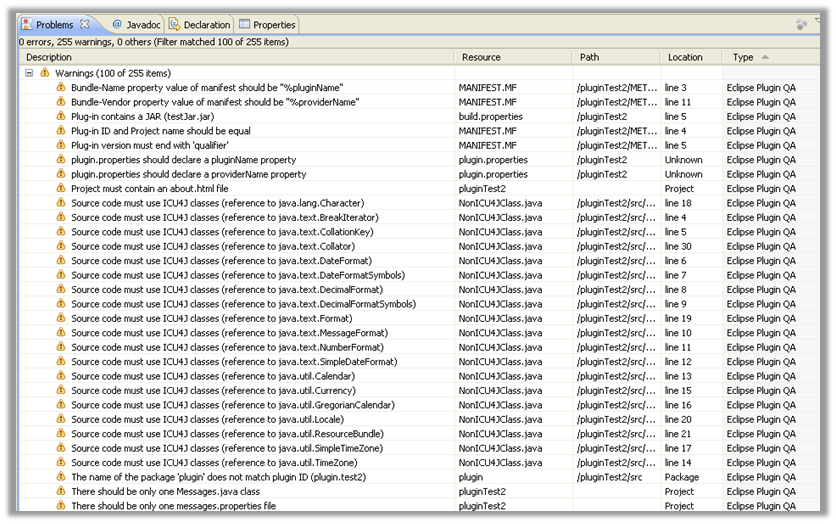
Today I participated to the 2nd Eclipse & OMG Symposium where I talked about MoDisco and how we support the specifications defined by ADM, the OMG task force working on Software Modernization. I presented an example where we use KDM (Knowledge Discovery Metamodel) and SMM (Structured Metrics Metamodel) to control the quality of Eclipse plugins.

We wanted to check automatically some rules which are mandatory by the yearly synchroneous release:
  • Version number ends with « qualifier »
  • Source code must use ICU4J classes
  • The project must contain an « about.html » file
  • Packages name should start with the plug-in Id
  • Plug-in must not contain JARs files
  • Plug-in should contain only one « message.properties » and « Message.java » files
We also wanted to check some rules that we had defined internally at Mia-Software:
  • “PLUGIN_ID” variable of “Activator.java” should be initialized with the plug-in Id
  • Plug-in Id and Project name should be equal
  • «Bundle-Vendor» property value of « MANIFEST.MF » should be « %providerName »
  • « plugin.properties » should declare a « providerName » property
  • «Bundle-Name» property value of « MANIFEST.MF » should be « %pluginName »
  • « plugin.properties » should declare a « pluginName » property
Of course, we could have implemented these rules by using the APIs provided by the plugins already provided by Eclipse (org.eclipse.core, org.eclipse.pde, org.eclipse.pde, etc). But all these APIs are not homogeneous, and it is not always easy to find the right API to use. That's why we decided to experiment an other approach.

Our idea is to use these APIs only to create EMF models of the plugin. Then, once the models are created, we can implement the rules by using only EMF APIs.


In our case, we have used MoDisco to create seven EMF models:
  • A KDMSource model describing the organization of the plugin project (files and directories)

  • A Java model describing the Java source code of the plugin
  • A Manifest model to describe the content of the MANIFEST.MF file
  • Two XML models to describe the content of the .project and .classpath files
  • Two KDMCode models to describe the content of the plugin.properties and the build.properties files
These models contain all the information required to check the rules listed below.

Rather than directly displaying the violations found in an Eclipse plug-in into the Eclipse Problems View, we use an SMM model to represent the result of the analysis. Then, we have developped a generic tool which displays each rule violation contained in this SMM model into the Eclipse Problems View.


The benefit of this approach is that you just have to know EMF APIs to implement the rules, or use any EMF-compliant tool (such as OCL, ATL or QVT). Another benefit is that the result (the SMM model) is independent from how you want to deliver it to the user. Here we have injected the violations into the Eclipse Problem View, but we could have generated an Excel file or populated a tool such as Sonar.

I have still some little things to improve in this plugin, and I'll try to to commit it this summer as a use-case in MoDisco.

Meanwhile, the complete presentation is available on slideshare.


Thursday, June 3, 2010

New MoDisco homepage

The MoDisco homepage is now based on the new template provided by Heiko Behrens from XText team.


Some modifications have been done in the CSS to avoid the blinking effect on quick links. This CSS is available here : http://www.eclipse.org/MoDisco/style.css

We still have to integrate a screencast, but it's already a good improvement.

Many thanks to Heiko !

Monday, May 31, 2010

MoDisco is ready for Helios

MoDisco 0.8 RC2 has been released last week. It contains all the features which will be shipped with the final Eclipse Helios release (available June 23, 2010).

Here are the main features added since MoDisco 0.8 M5:


Edition of models

MoDisco provides a browser to inspect complex EMF models. Now it is possible to use the ModelBrowser to edit and modify the instances of the loaded EMF model:
  • Edit attributes through the Properties view
  • Create new children elements
  • Delete a model element (with all its references)
  • Cut/Copy/Paste a model element
  • Undo/Redo modifications
  • Save and Save As the model


In addition, when the model is externally modified, the browser is automatically refreshed.


Collapse Link option

One of the main differences between the MoDisco ModelBrowser and the default EMF Reflective Editor is the way the children elements are displayed.

In the Reflective Editor, all the children model elements are placed directly under the parent model element: you don't see how the children are connected to the parent.


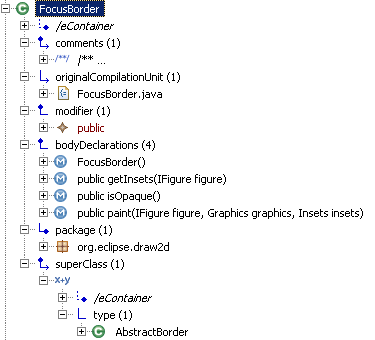
In the MoDisco ModelBrowser, the children are grouped under an intermediate node corresponding to the link defined in the metamodel.


This feature is very useful when instances of the same type can be associated through several different links: you can know precisely how the children are connected to the parent.
But in some cases this option is not convenient (for example when each children of a given type can only been attached with one relation).

That's why we have added a new option to the Customization model and corresponding editor: you can now collapse a link to hide this link in the browser and display the corresponding children directly under the parent.


Reusable Model TreeView

The TreeView developped for the ModelBrowser is now compliant with CNF (Common Navigator Framework).

This TreeView displays the model elements properties and allows accessing to related objects by navigating through relations defined in the metamodel.

Now this TreeView can be reused and integrated to any component compliant with CNF, and then benefit from the customization and extensibity mechanisms to dynamically configure which properties and relations are visible, add derived attributes and relations, and change how the model elements are displayed (label, color, icon, ...).

For example, the TreeView can easily be integrated into the Project Explorer to inspect the content of any EMF model:


The TreeView has already been adopted by the Papyrus team to replace the default treeview in the Package Explorer.


Java Model Query creation wizard

MoDisco provides a QueryManager to allow executing model queries independently of any technology. Drivers for Java, OCL and JXPath are provided to execute queries written with these technologies.

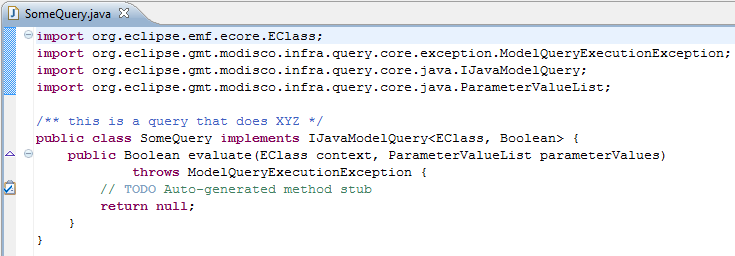
Since MoDisco 0.8 M6, a wizard facilitates the creation of queries written in Java:


The wizard generates the corresponding Java class stub, with the correct imports and generic parameters instantiation.