Thursday, October 14, 2010

Spy On Your Models - Part 1

Have you ever been stuck with an EMF model, trying to find what was going wrong? Which relation is broken or missing ? Where is that model element which should be there, related to that other one ? How many instances this EClass has in the model ?

Of course, you can use the EMF reflexive editor. It is suitable for small models, but when your model contains a lot of model elements it is hard to find your way (you must start from the roots elements, you don't see the name of the relations between the objects, the tree doesn't show the objects pointed by non-containment relations, etc).

So, if you really need this kind of information (and if you are not an expert in reading XMI files in plain text), the model browser provided by MoDisco is a solution for you.

To allow inspecting the details of large and complex EMF models, MoDisco (the Eclipse/modeling project dedicated to Software Modernization) provides an editor with lots of interesting features.

After MoDisco installation, you can right-click on any EMF resource and open the browser by selecting the menu "Open with > MoDisco Browser".


In this suite of posts, I will describe the main features of this tool.

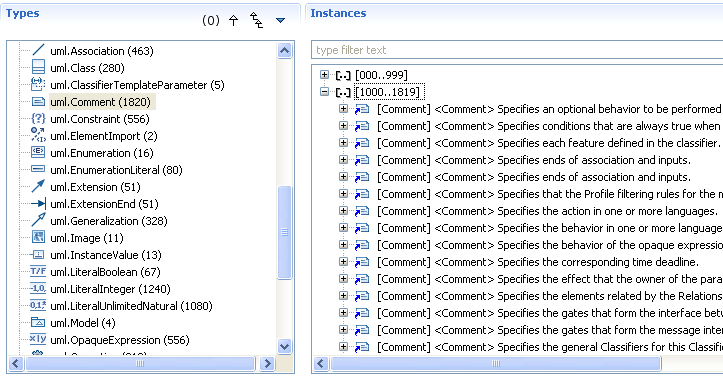
The first feature is a panel, on the left-side of the browser, displaying the classes (metaclasses) of the corresponding ECore definition (the metamodel). The selection of a type displays all its instances in the right-side panel. Each type is suffixed by the number of its instances. By default, only the types with at least one instance are listed, but if you click on the "(0)" button, the empty metaclasses are also listed.


Sometimes, it can be helpful to see also the instances of the subtypes too. For example, in a UML model, if you consider the DataType metaclass you may need to access also to the Enumeration and PrimitiveType instances. It is possible by clicking on the button "Display Instances of Submetaclasses".

By clicking on the button "Show Derivation Tree", you can also display these types in a tree, organized according to the "eSuperTypes" relation.


Four other options are available: to sort the types alphabetically, to sort them by the number of their instances, to group them by package and to show their full qualified name.

Of course, standard features provided by EMF on EClass are still available. For example to get the references to a metaclass, the menu "Show References" opens the view "EClass References".


Another important feature provided by the browser is the management of large models. If a type as more than 1000 instances, they are displayed by groups of 1000 instances.

In a next post, I will describe the features related to the Instances panel which allows to view the properties of each instance and to navigate through its references to other instances.

Friday, October 1, 2010

Using EMF to detect loops within a JSP

After my post explaining how to create EMF models from JSP pages, someone posted a comment on TheServerSide to know if the EMF model could be used to detect loops in the JSP (http://www.theserverside.com/news/thread.tss?thread_id=60980).

In fact, you can integrate loops in a JSP with several ways. The EMF model will represent these ways differently.

If you write a scriptlet containing a loop in Java (for, while, ...):

the EMF model created from this JSP will contain a JSPScriptlet object which contains the text of the scriptlet.
The discoverer currently provided by MoDisco does not parse the content of the scriptlet. It will be provided in a future version (after Indigo) by using the Java metamodel to represent the Java fragments contained in a scriptlet.

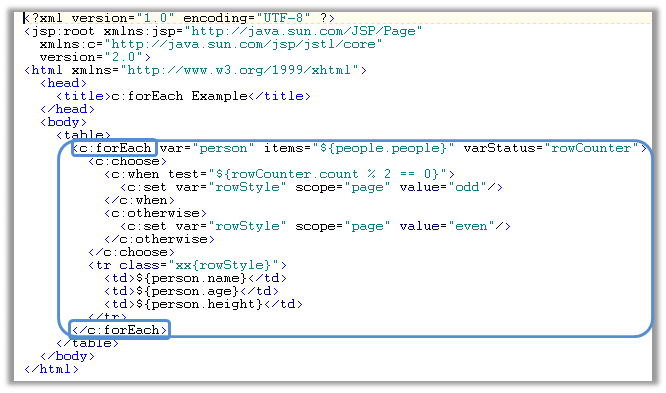
Another way for looping in a JSP can be achieved by using the "forEach" tag:

In this case, the EMF model will contain a JSPAction object whith the name of the tag ("c:forEach" here):

This EMF object contains children which are the attributes of the tag (var, items, varStatus, ...) and the sub elements of the tag (a JSPAction "c:choose" and an Element "tr"):


Monday, September 27, 2010

How to create EMF models from JSP pages ?

The next release of MoDisco (version 0.9) is under development and is planned to be released with Indigo. This release will come with new components for creating EMF models from the source code of JEE applications.

The current version (version 0.8) already provides components for creating EMF models from java source code (see this older post). In next version, new components will be dedicated to JSP reverse-engineering. They have been developped by Fabien Giquel and Nicolas Guyomar of Mia-Software.

They are composed of:
  • a metamodel for describing a JSP
  • a discoverer for creating a model from a set of JSP pages
  • a generator for generating JSP pages from a model
The JSP metamodel (defined with Ecore) is an extention of the XML metamodel (also provided by MoDisco) which contains types such as Page, JSPScriptlet, JSPExpression, JSPTagLib, etc.


The discoverer, is a component which analyzes JSP pages and creates an EMF model conforming to the JSP metamodel.

It can be launched from a project, or directly from JSP pages.

The result is an EMF model which can be opened with the MoDisco Model Browser.


The generator allows regenerating JSP files from an EMF model (conforming to the JSP metamodel). While it still needs to be improved to support a better formatting, yet it can already be used to produce JSP files.

With these new components, you can reverse-enginer JSP files and use EMF APIs in order to control coding norms, detect patterns, document existing pages or refactor them by applying transformation at the model level (and then use the generator to get a new version of your JSPs).

Thursday, September 23, 2010

EMF Facet project has been created

EMF Facet is a new Eclipse/Modeling project which will provide solutions to extend existing metamodels without changing them. It has been provisioned recently in EMFT by Greg Dupé of Mia-Software, the co-leader of the project.


With EMF Facet, it will be more easy to dynamically extend and customize a tool based on EMF.

The idea is to allow defining new attributes, new relations and new types in a non-intrusive way (you can read this older post about EMF Facet).

This mechanism has already been developped in the MoDisco project (the Eclipse/Modeling project dedicated to Software Modernization). It is completed by a QueryManager component which allow executing queries on a EMF model independently from the query technology (bridges for OCL, Java and XPath are already available). As it is independent from Software Modernization purposes, the corresponding code is going to move to this new EMF Facet project.

After some refactoring, it will be enriched with other components (such as customizable widgets to display extended EMF models). First version is planned to be ready in June 2011 for Indigo, the next Eclipse release. Before this date, early versions will be available with intermediate Indigo milestones.

To know more about this project, don't miss the talk EMF Facet: a Non-Intrusive Metamodel Extension Tooling, Thursday, the 4th of November during Eclipse Summit Europe 2010, in Germany.

Wednesday, June 30, 2010

Eclipse DemoCamp in Nantes

An Eclipse DemoCamp will be organized in Nantes the 8th of July.


It is a good opportunity to discover what's new in Helios and to meet teams directly involved in the development of the platform.

Here are the projects which will be highlighted:

- Glassfish, the JEE Application Server
- STP, the SOA Tools Platform
- MoDisco, the Model-Driven Software Modernization platform
- Acceleo, the Model-to-Text project
- ATL, the Model-to-Model project

Each project will be presented by one of their commiters (from SERLI, Mia-Software, Obeo and INRIA).

It's free and only two hours from Paris!


Thursday, June 24, 2010

Getting feedback from adopters

The OMG Technical meeting at Minneapolis is over, I will come back to Nantes tomorrow.

This kind of event is a very good opportunity to meet users of the tools we have developped for Eclipse. As anybody can download these tools, it is difficult to know precisely how they are used, and by who.

For example, this week I discovered that Nicolas Rouquette from the NASA, was using the MoDisco Model Browser to inspect complex XML documents! This browser has not been developped for this purpose. But, as MoDisco comes with an automatic transformation of XML files into EMF models, you can load any XML file directly into the browser, and benefit from all its navigation, filtering and customization capabilities!

Just click on an XML document, select the menu "Open with > Other..." and pick the "MoDisco Model Browser".


We really appreciate all these kinds of feedback: they are of great help while defining our roadmap :-))

If you have adopted (or are going to adopt) MoDisco , feel free to post your feedback (good or bad, it helps in both cases) on this blog, or on the MoDisco forum .

Helios is out. Now, let's take the Indigo train!


How to install MoDisco with Helios?

This year, for the Helios release, the Modeling Package offers a very simple way to install the Modeling components.

The Modeling Package is one of the Eclipse pre-packaged distributions available from the download page (http://www.eclipse.org/downloads/).


Once you have downloaded and launched this package, just click on the "Install Modeling Components" button from the toolbar.


This button opens a window displaying all the available Helios Modeling components. Select MoDisco and click on the Finish button.


A wizard appears to display all the MoDisco components which will be installed.


Click on Next, then click on the "I accept the terms of the licence agreement" to finish the installation.


Restart Eclipse and it's done! You have now access to the features provided by MoDisco 0.8.

Some of these features are directly available to manipulate or create EMF models, without having to write a line of code:
In addition, as a platform for Software Modernization projects, MoDisco also provides a lot of components to help you in the development of model-driven reverse-engineering tools.

Enjoy!