Showing posts with label ecore. Show all posts

Thursday, May 31, 2012

Modeling P&C Insurance Products, the MAIF Case-Study

EMF (Eclipse Modeling Framework) is mostly used to create model-driven tools for software or system engineers. Here, in this case-study, an EMF-based tool is directly used by business domain experts to create models which are deployed and interpreted at runtime.

MAIF is a french insurance company with 2.8 millions of insured members (ranked 5th in number of insured vehicules and habitations in France).

They needed a tool to get a structured, centralized and unified vision of the P&C (property and casualty) products (IARD in french for Incendie, Accidents et Risques Divers).

The goal was to provide to insurance business experts a dedicated tool to specify their marketing offers and the caracteristics of their products. 

The solution is a product catalog composed of:
  • a product workbench (based on Eclipse) to define and administrate the products structure
  • a repository to store the models
  • a business rules engine (based on JRules) to manage and execute the rules related to the products
Accessible via services the catalog is used to manage production version of contracts and claims.


The structure of the catalog, developed with the assistance of Capgemini and Obeo, is based on an Ecore model which defines the P&C products concepts (catalog, product, coverage, risk object, provision, option, etc) and the way they can be composed.


The product workbench is used by MAIF P&C experts to define the products and administrate their life-cycle.


It provides graphical representations to create, modify, consult, version and validate the products.


These GMF diagrams are graphical representations on EMF models describing each product. They have been specified with Obeo Designer

They selected Obeo Designer in order to speed-up the definition of the important number of GMF views to develop and to facilitate their maintenance.

Additional developments have been done in Eclipse to finalize the workbench:
  • RCP customization to simplify the workbench (menus, toolbars and views) according to the kind of users
  • integration of LDAP to authentificate the users and manage their roles (product manager, validator, ...)
  • integration of SVN to manage collaborative work on products

The models created by the workbench are directly consumed by the IT system through distributed services (progressively remplacing legacy ones).

Without the need of specific IT developements, the deployment of new products is reduced from several weeks to about one week.

This new approach increases the agility of P&C products deployment by reducing the gap between business experts and IT.

    You can find a more detailed description of this case-study, written by MAIF, on www.obeonetwork.com, in the case-studies section of Obeo Designer group (registration required).


    Thursday, May 24, 2012

    Creating a new Ecore model with Obeo Designer 6.0

    One of the cool things coming with Obeo Designer 6.0 is the new "Ecore Modeling Project" creation wizard.


    It automatically creates an EMF project containing an Ecore model and its corresponding genmodel. This project is also created with the Modeling Project nature and a Obeo Designer representation file (.aird) containing a diagram (depending on the viewpoint selected with the wizard).


    This diagram is automatically opened and you can directly start graphically design your Domain Model.


    Once you have defined your packages, classes, attributes, relations, ... you just have to open the genmodel and generate the EMF code. Of course you can customize the genmodel to introduce your own generation choices.

    This video demonstrates this new wizard on a simple Ecore model.


    Monday, October 18, 2010

    Spy On Your Models - Part 2


    In this sequence of posts, I explain how to use the Model Browser provided by MoDisco to inspect an EMF model.

    In the first post, I have described the Types panel which allows to directly access to all the EMF instances of a given EClass. In this second post, I will now describe the Instances panel which allows to inspect an EMF object and navigate to all the other connected EMF objects.


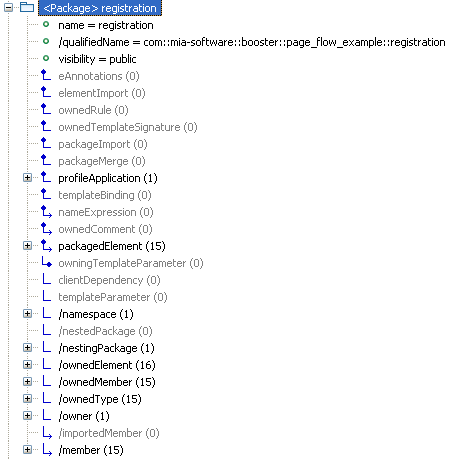
    This panel is a tree containing all the instances of the type selected in the Type panel. If you open a model element, you can see all its properties: the attributes and the references declared by the type (the metaclass) in the corresponding ECore model (the metamodel).


    The attributes are displayed with a green bullet and the value of the selected instance. The references are displayed with an icon inspired by UML associations: containment references have a diamond (like UML compositions), references with no opposite are terminated by an arrow (like UML navigable roles). Derived properties are prefixed by "/".

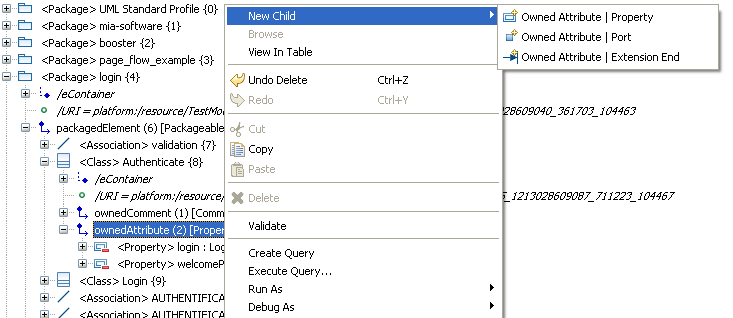
    On each reference, you can right-click and select the "Add child" menu to add new EMF objects.


    If you want to hide empty and derived references, unselect the buttons "Show Empty Links" and "Show Derived Links". Then the tree will only display setable references which have at least one connected object.


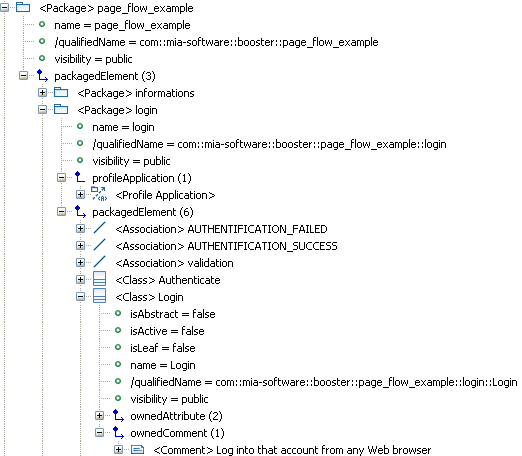
    When you open a reference, you can see all the objects connected through this reference. This is very helpful to know how the objects are connected to each other. Especially when the current type declares several references of the same type: in this case, you see precisely the connected objects under each reference.

    This instance tree proposes several other interesting options.


    Let's see some of these options:
    • Show Multiplicity: This option displays the upper and lower bounds (between square brackets) of each structural feature as they are defined in the corresponding ECore model.
    • Show Ordering: This option displays the index (between square brackets) of each element under a reference which has the "ordered" ECore property set to true. It is useful if you have already selected the "Sort instances" option which displays the elements in an alphabetical order. See below the instances of Property sorted by name under the ownedAttribute reference: they are suffixed by the index within the list of attributes of the current class.
    • Show Opposite Links: this option indicates the name of the opposite links (if there is one defined in the ECore model). This option helps to know which reference allows to go back to a given object. Below, you can see that the owner reference can be used to go from an instance of Comment back to the class CollectInformation.
    • Show Container: When there is no opposite link defined, this option helps you to go back to the container (the objects which holds the current object with a "containment" reference). The eContainer reference is part of the EMF framework.

    • Show Types of Links: This option indicates the Type declared for each reference. It is useful to know what kind of objects you can find under a reference. Below, you can see that the packagedElement reference accepts instances of PackageableElement. It explains why you find instances of Class and Association which both inherit from PackageableElement.

    In the next post, I will explain how this browser can be dynamically extended and customized.

    Saturday, March 27, 2010

    Back from EclipseCon 2010

    I came back to home today, after one week at Santa-Clara, near San-Francisco, attending my second EclipseCon.

    Last year, I only presented a poster. But this year I gave a talk about MoDisco and I participated to the Modeling Project runway organized by Kenn Hussey. Gabriel Barbier, my colleague from Mia-Software, had also a talk with Henrik Lindberg about B3 and the possibility to use MoDisco to extract build information from source code .


    Once again, I really enjoyed the conference and its organization: lots of interesting talks, very good keynotes (Steve Harris show was THE event of the week), but most of all it is the best way to share ideas, to meet people and to show what we working on.

    This year, we spent a lot of time explaining a project we propose to create. The EMF Facet project will provide mechanisms to dynamically extend ECore models: adding properties, references, operations without changing the initial ECore model. These mechanisms have already been developped as part of the MoDisco project. We propose to externalize them to make them more reusable by other projects. We received very good feedback on this project from all the Modeling Project members to whom we presented our ideas and the existing components. We will first submit the proposal to the Modeling PMC next week.

    Saturday, October 31, 2009

    Eclipse Summit Europe 2009

    This year was my first attending ESE, and it was worth it !

    The talks on modeling were very interesting (Xtext, EMFQuery, Papyrus, ...) and it was nice to meet the guys directly involved in the projects we are interested in.

    The Cloudsmith team, for example, to discuss how we could use MoDisco on the B3 project to analyse plugins and create models of builds. Or André Dietisheim about our tests with CDO to manage models of large Java applications created with MoDisco. Nice also to talk with Kenn, Ed, Ralph and many others.

    I had the chance to talk during both the Modeling Symposium (Tuesday) and a session dedicated to MoDisco (Thursday).

    With my colleague Gabriel Barbier of Mia-Software, who presented the demo Thursday, we shown how to create fine-grained models from Java source code (based on a Java.ecore metamodel), and how to navigate through this model with the model browser we have developped. We put the focus on the customization and the extensibility of this browser by using queries.

    You can dynamically change the icon, color, font ... of the instances of your models (by defining a UICustomization, stored in a EMF model), or add "virtual" types (not originally defined in your Ecore metamodel) with "virtual" properties and references (by defining a RoleSet, also stored in a EMF model). The query mechanism that we provide is generic : it allows integrating queries written in Java, EMFQuery, OCL, XPath or ATL.


    We presented the 0.8 version which is still under development (planned for the end of 2009). But thanks to Nicolas Bros who have put the releng in place, it is possible to download an integration build.

    The demos are online :
    - Demo during the Modeling Symposium
    - Demo during the MoDisco short talk